How do I read my smart meter?
Smart meters make it easy to track your electricity usage, helping you stay in control of your energy bills. Unlike traditional meters, smart meters automatically send your readings to your energy provider. With a smart meter, you can track your energy consumption in real time, making it easier to cut energy bills and reduce waste.
In this short guide, we will show you how to read your smart meter step by step, so you always know how much electricity you’re using.
What does a smart meter look like?
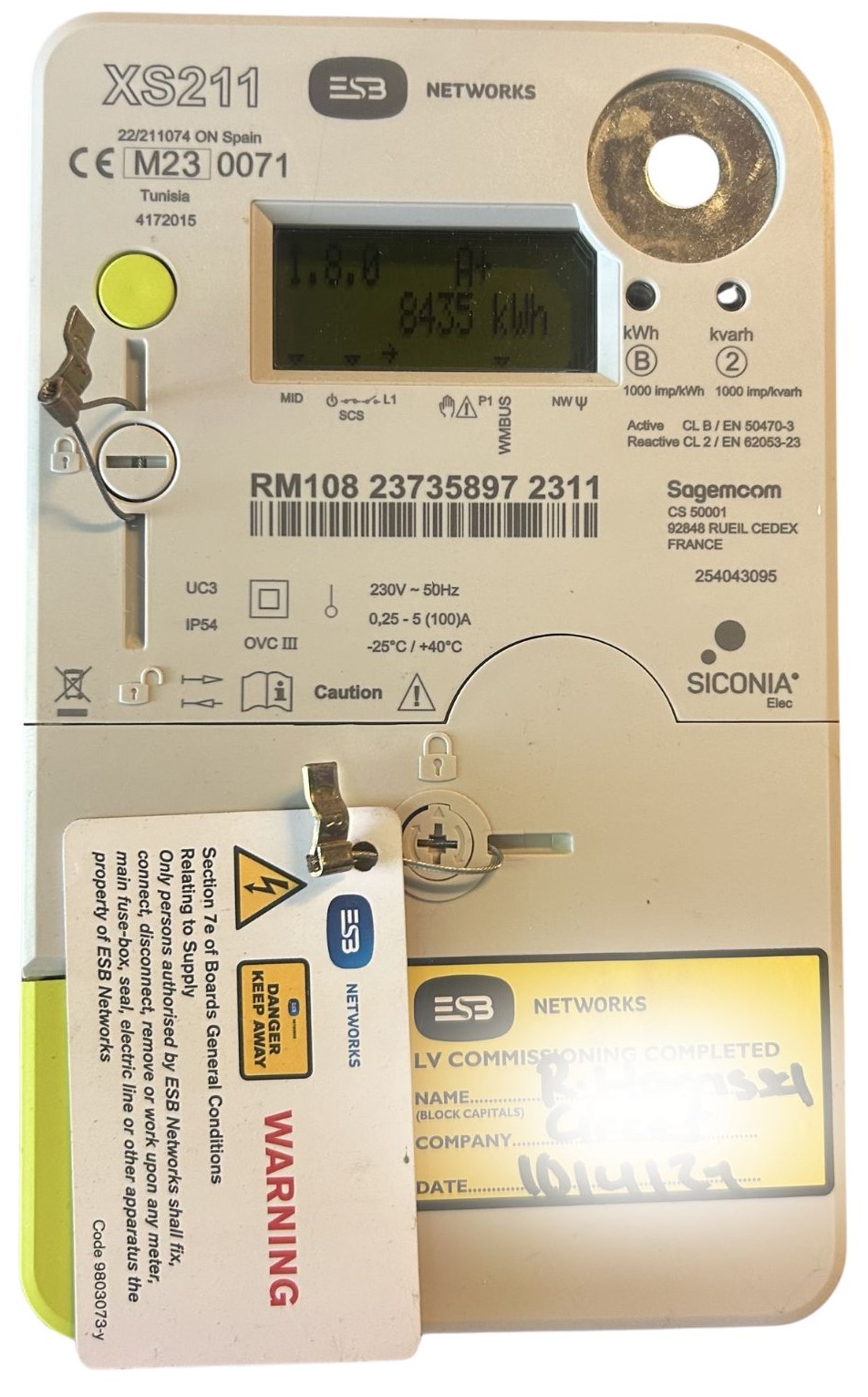
A smart electricity meter has a digital display showing your electricity usage in kilowatt-hours (kWh). It normally has a push button on the left that lets you move between the date, time and different usage readings.
Your smart meter is usually installed in the same location as the electricity meter it replaced. Its exact appearance, button colour and screen sequence may vary slightly depending on the meter model.
.jpg)
How to read your smart meter display
Your smart meter screen shows your electricity use in kWh (kilowatt-hours). This number is your meter reading.
- The main number on the screen is your total electricity usage.
- Read all the numbers from left to right, just like reading a book.
- You don't need to press any buttons to see this number.
How to check your smart meter’s day, night & peak readings
If you have a smart meter plan with different electricity rates for day, night, and peak hours, you can check each reading as follows:
1. Night Reading (T1): Press the left blue button three times. The screen will show “A+T1” in the right-hand corner.

2. Day Reading (T2): Press the left blue button four times. The screen will show “A+T2” in the right-hand corner.

3. Peak Reading (T3): Press the left blue button five times. The screen will show “A+T3” in the right-hand corner.

These smart meter readings help you see how much electricity you use at different times of the day.
| Display | Meaning | Button presses |
|---|---|---|
| Default screen | Total cumulative electricity usage | None |
| Date and time | Current date and time | 1 |
| Cumulative read | Total electricity usage | 2 |
| A+ T1 | Night usage | 3 |
| A+ T2 | Day usage | 4 |
| A+ T3 | Peak usage | 5 |
| Test screen | Meter test display | 6 |
| A− | Total electricity exported to the grid | 7 |
Extra smart reading tips
- Check the date and time: Press the left blue button once.
- See how much electricity you export (if you have solar panels): Press the left blue button seven times until you see “A-” in the right-hand corner of your screen.
By checking your smart meter readings regularly, you can better understand your energy usage and find ways to save on your electricity bills.
You can also read our detailed guide on the pros and cons of smart meters before deciding whether to have one installed.
Please Note: If you have an MCC16 Smart Tariff, you may be required to submit meter readings from your smart meter.