
Top questions
You can send us your meter reading in a few easy ways:
- Online: Log in to your Energia online account and enter your reading
- By phone: You can contact us and submit your reading over the phone
- By text to ESB: Text 087 960 9223 in the following format: *MPRN* [space] *reading*
- By email: You can email your reading to [email protected]
Sending regular readings helps keep your bills accurate and up to date.
View our video for some tips on how to take and submit a meter reading.
There are different types of electricity meters, but reading them is simple once you know what to look for. View our step-by-step guide to see how to read your meter correctly here.
You can also view our video for some tips on how to take and submit a meter reading.
Energia offers a range of smart meter plans designed to work with your new smart meter.
You can view and compare our best smart energy plan options online.
Your meter is usually found:
In houses:
- Outside, in a meter box on an external wall
In apartments:
- In a communal meter cupboard, which is usually managed by your landlord or building management
If you can’t find your meter, contact us or ESB Networks for help.
If your meter box is locked and you don’t have a key, you can request one from:
ESB Networks (Electricity meters):
- Call 1800 372 757 or +353 21 2386555 to request a meter key.
Gas Networks Ireland (Gas meters):
- You can request a gas meter key online through the Gas Networks Ireland website.
There are different types of electricity meters, but reading them is simple once you know what to look for. View our step-by-step guide to see how to read your meter correctly here.
You can also view our video for some tips on how to take and submit a meter reading.
Your meter is usually read four times a year. Electricity meters are read by ESB Networks, and gas meters are read by Gas Networks Ireland.
What happens next:
• The readings are sent to us so we can create your bill.
• If a reading is not available, we may ask you to send one yourself. This helps you avoid estimated bills and keeps your account accurate.
• If you have a reconfigured smart meter with a good signal, it can send readings automatically.
• If your smart meter has not been reconfigured, it will not send automatic readings and you may need to send them yourself.
You can send us your meter reading in a few easy ways:
- Online: Log in to your Energia online account and enter your reading
- By phone: You can contact us and submit your reading over the phone
- By text to ESB: Text 087 960 9223 in the following format: *MPRN* [space] *reading*
- By email: You can email your reading to [email protected]
Sending regular readings helps keep your bills accurate and up to date.
View our video for some tips on how to take and submit a meter reading.
If you have any questions about prepayment meters, we’re here to help. You can contact us in the following ways:
- Online: Fill out our enquiry form on the website.
- Post: Write to Energia, PO Box 12380, Dublin 2.
- Email: Send us an email at [email protected].
- Phone: Call us on 0818 642 642.
Before installing a prepayment meter (PPM), we’ll talk with you to make sure it’s the right option for your situation.
You may be eligible if:
- You’re having difficulty paying your energy bills and agree to have a PPM installed
- You’re not critically dependent on equipment that needs electricity to work
- Your home uses a 24-hour electricity tariff
- You can easily reach the meter to top it up
- There’s a nearby shop or outlet where you can buy credit for the meter
If you don’t meet these conditions, like if you rely on medical equipment powered by electricity, we’ll work with you to find another way to manage your payments.
If you live in rented accommodation, we’ll need your landlord’s permission before installing a PPM. We’ll also check that your current meter is suitable.
Please note: If your PPM runs out of credit, your electricity supply will stop until you top it up, even during winter.
There are two types of tariffs for Pay As You Go meters:
Standard Prepay Tariff
- This is the same as our Standard Tariff.
- You won’t pay anything extra for having a Pay As You Go meter.
Repayment Tariff
- This is for customers who are repaying a debt through their prepayment meter.
- A percentage of each top-up goes towards your debt.
- The rest covers your daily standing charge and the cost of the electricity or gas you use.
- You’ll always have some credit left for your energy usage.
More information
- See Energia’s rates and tariffs for a full breakdown of charges
- We’ll let you know in advance if our standard rates change.
Tip: Top up your card during summer to prevent daily standing charges from building up.
A prepayment meter helps you stay in control of your energy use and payments:
- You only pay for the energy you use
- There are no bills to worry about
- Emergency credit may be available if you run out
- You can manage any unpaid bills while still keeping your supply on
Buying a top-up
- Bring your Prepayment Card or PPM number to any Payzone outlet.
- Look for shops with the Payzone sign or use the Payzone website to find your nearest outlet.
- You can top up any amount from €10 to €100.
- Give your card and payment to the shop assistant, and they’ll process your top-up.
- You’ll get a receipt with a 20-digit code (sometimes longer if tariffs change).
- Use this code to add credit to your meter at home.
Emergency credit
- When your credit drops to €2, your meter will make a low-volume warning sound for 2 minutes.
- Press 0 on your PPM to turn off the sound.
- After that, you can use up to €20 of emergency credit.
- Make sure your next top-up covers the emergency credit you’ve used as this needs to be cleared plus a little extra for ongoing usage.
A pre-payment meter (PPM) can help you manage your energy costs if you’re finding it hard to keep up with household bills. It lets you pay for electricity or gas as you go, making budgeting easier.
How it works
- Our Payment and Account Resolutions Team can arrange to install a PPM in your home.
- Any balance on your account will be added to the meter and recovered at 15%.
- Each time you top up, 15% goes towards your outstanding balance and 85% towards your energy use.
Example
- If €100 is transferred to your PPM and you top up €10:
– €1.50 will reduce your balance to €98.50.
– €8.50 will go towards your energy use.
Important information
- If you live in rented accommodation, we’ll need your landlord’s permission before installation.
- We’ll also check that your current meter is compatible with a PPM.
Need help?
- Chat with our Payment and Account Resolutions Team via phone on 0818 642 642.
- Available Monday to Friday, 9am – 5pm.
Switching to a prepayment meter helps you pay off any outstanding balance gradually while still getting energy.
How it works
- Each time you top up, 15% goes towards your outstanding balance.
- The rest is credited to your meter for ongoing usage.
- We’ll let you know when your balance is fully cleared.
Example
- If €100 is transferred to your PPM and you top up €10:
– €1.50 will reduce your balance to €98.50.
– €8.50 will go towards your energy use.
Statements
- Energia will send you between one and four account statements each year.
Need a different option?
If this repayment plan doesn’t suit you, call our Payment and Account Resolutions Team on 0818 642 642 to discuss alternatives.
A standing charge is a fixed daily charge that helps cover the cost of keeping your home connected to the electricity network.
Important to know:
- Standing charges apply even if your meter has no credit
- When you top up your meter next, any unpaid standing charges will be deducted from your credit
- To avoid unexpected deductions, keep your meter topped up regularly
The PSO (Public Service Obligation) levy is a charge set by the Irish Government and applied to all electricity customers in Ireland.
It helps support the generation of electricity from:
- Renewable sources (like wind and solar)
- Sustainable and indigenous sources (produced within Ireland)
The levy is reviewed and set each year by the Commission for Regulation of Utilities (CRU) and appears as a separate item on your electricity bill. In some cases, the levy may be negative, meaning you’ll receive a credit on your bill instead of a charge.
From 1 December 2025
The Annual Levy including VAT is €19.10. It is also a debit and is adjusted through a vend code.
Electricity meters
If you experience any technical problems with your meter, please contact ESB Networks directly.
The ESB Networks 24-hour Emergency Line is 1800 372 999.
Common rejection messages on your electric prepayment meter:
- "Error": The top-up code has the wrong number of digits
- "Accepted": The top-up code has been accepted by your meter
- "Rejected": The top-up code was not accepted by your meter
- "Wrong Tar": The Price Plan has been updated and the meter is waiting for a 40 digit code to be entered in order to update its records
- "Duplicate": The top-up code was already used
- "Credit Hi": The meter has received the maximum amount of credit and cannot accept another Top-Up code
- "Incorrect": - The Top Up code has been entered incorrectly, or does not relate to that specific meter
Gas meters
If you experience any technical problems with your gas meter, please contact Gas Networks Ireland directly. If you smell gas call Gas Networks Ireland 24-Hour Emergency Service on 1800 20 50 50 immediately.
PAYG Gas Meter
If you have any queries or problems with the operation of your gas meter, please contact Gas Networks Ireland, Customer Care Team on 1800 464 464 Monday to Friday 8am – 8pm Saturday 9am – 5.30pm or Email [email protected]
PAYG Gas card
If you have any issues with your gas card, please contact your gas supplier or nearest Payzone outlet. Alternatively, you can log onto: www.payzone.ie
Common gas card meter issues:
- If your PAYG gas meter won’t accept your card, remove the card, wipe it with a clean cloth and try again
- If it still fails, press the red button (A). If it shows 0.00, return to the shop where you bought credit as the card has not been credited correctly
- If you see Card Fail/Card Not Accepted on the display screen, make sure you’re using the correct gas card. If the problem continues, get a new card from a Payzone outlet and dispose of the old one
If you are moving house, please call 0818 405 405. We would advise topping up smaller amounts prior to any home move.
Please note until you have entered the deactivation code, your meter will require topping up for you to receive supply. It will self-disconnect without top up.
I have registered with Energia:
Thanks for joining – In most scenarios Energia can provide you with the deactivation code for your electricity prepayment meter – Call us on 0818 405 405
I have a smart prepayment meter:
This should be de-activated automatically within 10 days by your previous supplier, you need to ensure your meter is kept in credit.
My current supplier is Prepay power/Panda power:
If your previous supplier is pre-pay power or panda power, you need to contact them directly to arrange the meter to be de-activated.
I have left Energia:
We are sorry to see you go, if your new supplier is unable to provide you with the deactivation code, then please call Energia on 0818 642 642 and we will provide this for you.
Installing a gas prepayment meter
- Before installation, we’ll check if this is the best option for you.
- Call us on 0818 642 642 to arrange installation.
- A Gas Networks Ireland technician will fit the meter in about 45 minutes.
Your technician will:
- Install and test the meter to make sure it works properly.
- Show you how to use the meter and explain emergency credit.
- Give you your gas card. Insert this into the meter before buying your first credit.
- Provide all the information you need about your Pay As You Go gas meter.
Important: Pay As You Go gas meters cannot be installed in some apartments or under stairwells. Some customers are protected from disconnection during winter. However, if the credit is not maintained on a prepayment meter, the supply will turn off until a sufficient top up is applied.
Purchasing credit
- Buy credit at Payzone outlets.
- Credit cannot be purchased online or by phone.
- Look for shops with the Payzone sign or use the Payzone website to find your nearest outlet.
Emergency credit
- If your credit runs low, you can use up to €20 of emergency credit.
- When you top up next, 35% of the amount will repay the emergency credit.
Example: If you used €20 and top up €10, €3.50 will go towards repayment.
- If you have debt on your meter, an extra 10% will also be taken from your top-up.
- If emergency credit runs out, your gas supply will stop until you top up again.
If you are changing your meter from a prepaid meter to a credit meter there may be a charge for doing so.
If you’re joining Energia and your current meter can switch between prepayment and credit:
- We’ll send you a deactivation code to change your meter to credit mode
- You’ll need to enter this code to stop topping up. Until then, your meter will still disconnect if it runs out of credit
- Any top-ups made after you register with Energia may be refunded by your previous supplier, you’ll need to ask them directly
Note: If your meter can’t be switched, we may need to replace it.
If you have a SMART prepayment meter
- Your previous supplier should deactivate it automatically within 10 days
- Keep your meter topped up until the switch is complete
If your previous supplier is Prepay Power
- You’ll need to contact Prepay Power directly to arrange the meter to be de-activated
If you’ve left Energia
- We are sorry to see you go, if you are also changing to a credit meter and your new supplier is unable to provide you with a deactivation code, contact us and we’ll provide this for you
To switch to a gas credit meter, please get in touch through our online contact form or please call us on 0818 642 642.
A smart meter is the next generation of electricity meter. It uses digital technology to give you accurate information about your energy use throughout the day.
Why smart meters matter
- They help you understand when and how you use electricity.
- They support more efficient energy management.
For more information, check out our smart meter blog.
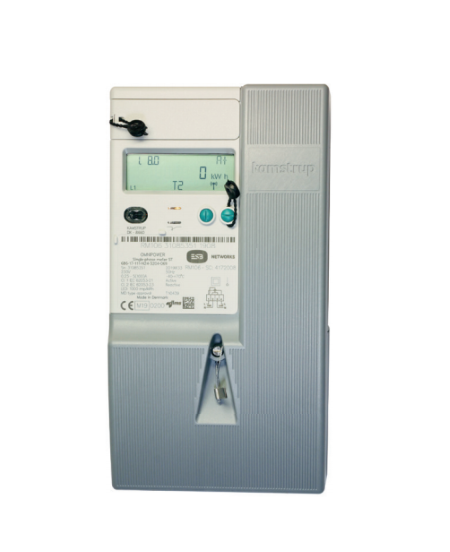
Meters are being replaced to future-proof Irish homes and deliver benefits for consumers, the environment, and the economy.
For you as a customer
- Smart meters replace older mechanical meters.
- Access detailed information about your energy use to make informed choices about tariffs and consumption.
- Better control over your bills and more options for products and services.
For the environment
- Smart meters encourage energy efficiency.
- They support more renewable power on the electricity system.
- The upgrade helps reduce CO₂ emissions and lowers Ireland’s reliance on fossil fuel imports.
For the economy
- Smart meters help manage energy flow more efficiently during times of high demand.
Smart meters and standard meters work differently when it comes to how they record and share your energy usage. Here’s what sets them apart:
Smart meters
- Use a secure wireless connection (similar to mobile phones) to send your energy usage automatically to your energy provider.
- Provide detailed insights into your energy use, helping you manage consumption more effectively.
Standard meters
- Do not have this technology.
- Offer limited data and require manual readings.
Read our pros and cons of smart meters article where we discuss both more.
The National Smart Metering Programme began in late 2019, and over 2 million smart meters have already been installed in homes and businesses across Ireland.
What happens next
- ESB Networks is carrying out the rollout nationwide.
- You’ll receive advance notice from ESB before they come to your area to complete the installation.
Smart meters are an important part of Ireland’s Climate Action Plan. They help move the country towards a carbon free electricity network.
Why they matter
- They support smart grids, which make the electricity system more efficient.
- They enable electric transport and heating.
- They make it easier to use local renewable energy and microgeneration.
Smart meters started being installed to homes, farms and businesses across Ireland in late 2019 by ESB Networks. Smart meters are being installed on a phased basis with ESB being on track to complete the installation of over 2 million meters in 2025.
You can apply to ESB Networks for a prioritised installation of a smart meter. When contacting ESB Networks, you'll need your 11-digit MPRN number to hand. This can be found on your electricity supply bill and always starts with '10'.
You’ll usually know if you have a smart meter because:
Before installation
- ESB Networks sends you a letter to let you know a smart meter will be installed.
During installation
- An ESB Networks engineer installs the meter and informs you directly.
- The engineer normally gives you a brochure with details about your new smart meter.
No, you don’t need to pay extra for your smart meter upgrade.
Why?
- The cost of replacing your meter is already included in your electricity network charges.
- There is no additional cost to you.
Your smart meter will be installed by an ESB Networks technician or an ESB Networks electrical contractor.
How to know they’re genuine
- All installers carry photo ID badges.
- Each badge includes a photo, company logos, and confirms they work for or on behalf of ESB Networks.
If you’re unsure
• Call ESB Networks on 1800 928 123 or 01 698 5005 to check.
A smart meter can give you more control and accuracy when managing your energy use. The benefits you receive depend on the type of smart meter setup you have.
Key benefits
- If you have a reconfigured smart meter on an MCC12 tariff, you can see detailed information about how and when you use energy throughout the day. This can help you understand your usage patterns and make informed choices about the tariff that suits you best.
- Smart meters can send your readings to ESB Networks automatically, which helps keep your account up to date.
Important information about meter types
- A standard unconfigured smart meter on its own, or a smart meter that is reconfigured to MCC16, will not provide detailed daily usage information and will not be able to send automatic readings.
- Customers with these meter types will not receive the same level of data and may still need to provide meter readings when asked.
For more information, you can read our Pros and Cons of Smart Meters guide.
A smart meter can record different levels of information depending on how it is configured. A reconfigured smart meter on an MCC12 tariff provides the most detailed data.
Daily data sent to ESB Networks
- A reconfigured MCC12 smart meter sends your total electricity use from the previous twenty four hours, usually around midnight each day.
- This information is sent securely over a 2G mobile network.
- ESB Networks uses this data for billing, switching suppliers and moving premises.
More detailed usage information
- A reconfigured MCC12 smart meter also records your electricity use in thirty minute intervals.
- These intervals can give you a clearer picture of your energy habits throughout the day.
Diagnostic checks
- From time to time, the meter sends ESB Networks diagnostic information to confirm that everything is working as it should.
Information for customers with MCC16 meters
- These meters do not send automatic daily readings or thirty minute interval data.
- The meter is read in the traditional way every two months.
- You may still be asked to send in a meter reading if ESB Networks does not have an up-to-date read for your property.
Yes, your smart meter data is secure.
How your data is protected
- All data is encrypted and stored safely by ESB Networks in a central Meter Data Management System (MDMS).
- ESB Networks follows strict data protection rules to keep your personal information secure.
No. Your smart meter does not use up or work with your own home wifi.
In most cases, no. Smart meters can send readings automatically, so a meter reader will not usually need to visit your home.
When a visit might happen
- If your smart meter has poor connectivity, ESB Networks may need to take manual readings.
- This could happen up to six times a year for a small number of customers.
- A meter reader will still call if your smart meter has not been reconfigured.
- A meter reader will also call if you are on a smart MCC16 tariff, as these meters do not send automatic readings.
Your smart meter shows your total electricity use in kilowatt-hours (kWh).
To read it
- Look at the main number on the screen.
- Read it from left to right, just like a book.
- You don’t need to press any buttons to see this overall consumption figure.
For details on how to check your smart meter’s day, night and peak readings, view our step-by-step guide on how to read your smart meter.
With a smart meter, you usually do not need to submit readings yourself. Energia receives your readings automatically from ESB Networks.
How it works
- When your smart meter has good connectivity, readings are sent automatically to ESB Networks.
- This means you no longer need to take manual readings.
- ESB Networks checks and confirms the connectivity score for your smart meter.
- If ESB Networks finds that the connectivity score has dropped below 3, the meter cannot reliably connect to the secure network.
- When this happens, the meter will stop supporting thirty minute interval data services, and automatic readings may not come through.
Important information about meter types
- Automatic readings only work for a reconfigured smart meter on MCC12 with good connectivity.
- If you have an MCC16 meter or a smart meter that has not been reconfigured, we will still ask you to send us your meter readings.
Energia offers a range of smart meter plans designed to work with your new smart meter.
You can view and compare our best smart energy plan options online.
Smart meter plans use three time bands for electricity rates:
- Peak rate: Applied between 5pm and 7pm.
- Day rate: Applied between 8am and 11pm, excluding peak hours.
- Night rate: Applied between 11pm and 8am.
A time of use tariff means the price you pay for electricity changes depending on when you use it.
How it works
- Electricity costs less during off-peak times, usually overnight.
- It costs more during peak times when demand is high.
- This tariff can help you save money if you use more electricity during cheaper periods.
Yes. You can switch between smart meter plans at any time. There is no financial penalty for changing your plan.
What to know before switching
- Your ability to move between plans depends on your smart meter connectivity.
- If your meter has good connectivity, you can change plans easily.
- If connectivity is poor, some plans may not be available.
You can have a smart meter installed and stay on your current non-smart tariff. However, once you move to an Energia Smart energy plan, you cannot switch back to a standard plan.
Why choose a smart plan?
- Our smart meter plans are designed to give you the best value and service.
- They include features to help you save energy and manage your costs more effectively.
You’ll still receive your bill every two months, just like before.
How payments work
- If you’ve chosen Level Pay, you’ll pay by monthly direct debit.
- If you’ve chosen Variable Direct Debit, you’ll pay every two months.
If you’re on an MCC12 Smart plan, your bill will look a little different.
What changes
- You will no longer see traditional meter readings on your bill.
- Instead, your bill will show your electricity usage for that period as data.
Regardless of your agreed tariff, your data will display in Day, Night and Peak time bands on your bill to give you an insight into your usage.
At the moment, there is no smart meter available for gas.
No, Energia does not offer a gas-only smart tariff.
Your options
- We offer a Standard Gas only plan.
- You can also choose a Dual Fuel plan, which includes smart electricity or standard electricity and standard gas.
- Note: Gas meter readings will still be required for your gas usage.
Why?
- The National Smart Metering Programme only applies to electricity meters.
Smart meters send your data securely to ESB Networks using a 2G mobile network, similar to how text messages work.
There are instances where the collection of actual interval readings from meters is delayed due to communication issues, power outages, or other technical challenges. In such cases, ESB Networks provides electricity suppliers with estimated consumption values for the affected meters and interval periods.
Typically, these estimates are automatically replaced with actual readings once the underlying issue is resolved. However, in exceptional circumstances where this automatic update does not occur, or actual interval readings are not available, ESB Networks substitutes the initial estimates with more accurate interval estimates. These are derived from the total recorded usage (i.e. the cumulative register read) for the relevant period. The revised data is then provided to the electricity supplier, which may result in the issuance of an updated bill or statement, depending on the timing. See ESB Networks Meter reading policy for more information.
You will see an adjustment ‘ESBN Replacement Data Adjustment’ on your bill if we have received data for your MPRN.
ESB Networks identified that there were cases going back to 2023, where initial estimated interval values had not been replaced with actual meter readings. To address this, a process was implemented by ESB Networks to update these initial estimates with more accurate interval estimates. You will see an adjustment ‘ESBN Replacement Data Adjustment’ on your bill if you have been impacted by this. ESBN statement: Meter reading policy | ESB Networks
Energia guides
Autumn Energy Saving Tips for Irish Homes
As temperatures dip and evenings draw in, small adjustments to how you heat, light and run your home can make a noticeable difference to comfort and bills.
.jpg?ext=.jpg)
What is renewable energy?
Renewable energy comes from natural sources that replenish over time, including wind, sunlight, water, geothermal heat and biomass. It can be used to generate electricity, provide heating and produce renewable fuels.
How to start living greener
Explore five easy steps that you can take to live a greener lifestyle and minimize your carbon footprint.
